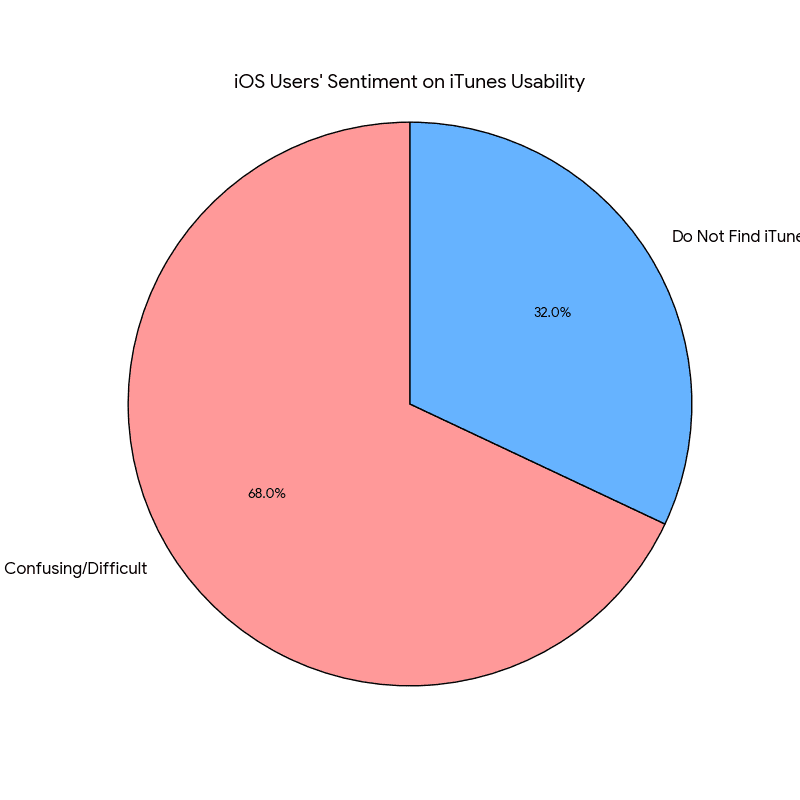
Managing your iPhone or iPad shouldn’t be this hard. But if you’re like most iOS users, you’ve probably spent hours trying to figure out simple things like transferring photos to your computer or backing up your device.
That’s why 3uTools was created. It’s a free Windows program that does everything iTunes does but faster, easier, and with more features. Let’s look at what 3uTools Mobile V3 and newer versions bring to the table.
For a complete guide on 3uTools, visit our separate blog 3uTools: The All-in-ONE Solution.
What is 3uTools?
3uTools is a free program for Windows computers that helps you manage your iPhone, iPad, or iPod. Think of it as a better version of iTunes. It does everything iTunes does, plus a whole lot more.
The best part? It’s completely free. No subscriptions, no hidden costs, no premium features you have to pay for. Just download it and use all the features right away.
The program has been around since 2014 and gets updated regularly to work with the newest iPhones and iOS versions. Currently, version 3.0 and newer versions have some useful features that make iPhone management straightforward.
Key Features of 3uTools v3.0 and Newer Versions
3uTools v3.0 and above bring more power and flexibility to iPhone and iPad management. From easier file transfers and faster backups to app control, data recovery, and privacy protection, the newer versions have made everything simpler and more reliable.
Easy File Management
File transfers feel effortless with 3uTools. The drag and drop system is much easier than iTunes, letting you move photos, videos, and music without worrying about syncing. Your music library stays safe when you add new tracks, and you can create custom ringtones in just a few clicks. Managing documents such as PDFs and ePubs is just as smooth, as they can be moved between your computer and iPhone in seconds.
Fast and Flexible Backups
Backups are faster and more flexible compared to iTunes. You can save a complete copy of your apps, photos, contacts, messages, and settings, or choose only the data you want. The program records backup dates, sizes, and contents, so you always know what is stored. Restoring is quicker too, and moving your data to a new iPhone becomes stress free.
App Management
With 3uTools, you can install multiple apps at once, back up app files, and arrange your home screen from your computer without having to drag icons one by one. This makes managing your installed apps significantly faster than doing the same directly on the iPhone screen.
Recover Lost Data
If you delete something important, 3uTools can scan your device for recently removed photos, contacts, messages, or notes. Even if the files cannot be restored directly, you can still extract them from old backups without restoring your entire device.
Device Health Reports
3uTools provides insights into your iPhone’s health that are usually only available at Apple Stores. You can check battery charge cycles, real capacity, CPU and memory usage, and storage breakdowns with clear charts. The software also shows technical details like serial numbers, iOS version, and Activation Lock status, giving you a full picture of your device.
Custom Ringtones Made Simple
Turning your favorite song into a ringtone is easy with 3uTools. You can trim any section, adjust volume, and add fade effects. There is also a built-in library of ready-made tones, and you can create custom notification sounds for texts and alerts without syncing through iTunes.
Smarter iOS Version Management
Newer versions of 3uTools include Smart Flash, which automatically matches the correct firmware for your device. You can download and install official iOS updates more quickly and switch your phone into recovery or DFU mode with on-screen guidance. Every firmware file is checked for safety before installation.
Screen Mirroring and Recording
3uTools allows you to mirror your iPhone screen to your computer through USB or Wi-Fi. You can record your screen, take snapshots, and in some builds even use partial remote control from your PC. This makes it a useful tool for tutorials, gaming, or video calls.
Virtual Location Tool
The Virtual Location feature has been improved in newer versions. Instead of only entering coordinates, you can now select a place directly from an interactive map and set your iPhone’s GPS location. This is useful for developers testing location-based apps or for managing location privacy.
Expanded Toolbox
The Toolbox section continues to grow, offering features like garbage cleaning, audio and video conversion, real-time logs, and other practical utilities. These additions make 3uTools more of an all-in-one solution for iPhone management.
Privacy and Security Options
3uTools also keeps your privacy safe. If you plan to sell your device, you can securely erase all files so they cannot be recovered. Backups can be encrypted with passwords, browser caches and cookies can be cleaned instantly, and you can check app permissions to see exactly what data your apps are accessing.
Why People Choose 3uTools
It’s Free
Many iOS tools charge $30 to $50 per year. 3uTools gives you everything for free with no limitations.
You Don’t Need iTunes Running
While iTunes drivers are needed, you don’t need the actual iTunes program running. This saves computer memory and reduces complications.
It’s Fast
Things that take minutes in iTunes take seconds in 3uTools. The program is optimized to work quickly.
Regular Updates
The developers update 3uTools regularly to support new iPhones and iOS versions. It stays current with the latest devices and iOS releases.
Easy to Use
Even if you’re not tech-savvy, 3uTools’ clean design makes everything straightforward. But it also has advanced features for experienced users.
Everything in One Place
Instead of needing multiple different programs, 3uTools handles file management, backups, diagnostics, and customization all from a single interface.
How to Get Started with 3uTools
What You Need
To get started with 3uTools, you’ll need a Windows computer running Windows 7, 8, 10, or 11. You’ll also need an iPhone, iPad, or iPod that you want to connect, along with a USB cable, preferably the original Apple cable or a high-quality certified one, as poor cables can cause connection issues. An active internet connection is also required for downloading and installing the software.
Installing 3uTools
The installation process is quick and straightforward. Go to the official 3uTools website and download the program. Once the installer file is ready, run it and follow the simple on-screen instructions to complete the setup. After installation, connect your iPhone to your computer using the USB cable. On your iPhone, tap Trust This Computer when prompted to allow access. Once that’s done, open 3uTools and you’re ready to start exploring its features.
Tips for Best Results
To get the most out of 3uTools, make a backup of your device before trying anything new. Keep 3uTools updated to the latest version to ensure smooth performance and access to the newest features. Use a good quality USB cable, since cheap or faulty cables can lead to failed connections or data transfer problems. Before using any feature, take a moment to read what it does to avoid mistakes.
Conclusion
Managing your iPhone doesn’t have to be frustrating anymore. 3uTools brings together everything you need in one free, easy-to-use program.
Whether you just want to transfer photos faster, make reliable backups, check your battery health, or monitor your device’s hardware status, 3uTools has you covered. The program solves the common problems that come with iTunes while adding practical features that Apple’s native tools simply don’t offer.
With regular updates to support the latest devices, 3uTools has proven itself as a reliable iPhone management tool for Windows users. And the fact that it’s completely free makes it a straightforward choice for anyone looking for a better alternative to iTunes.
Frequently Asked Questions
Is 3uTools safe to use?
Yes, 3uTools is safe. It’s been around since 2014 and has millions of downloads worldwide. Standard operations such as file transfers, backups, and diagnostics do not affect your Apple warranty. Always download from the official website to avoid modified versions.
Does 3uTools work on Mac computers?
Yes. An official native macOS version of 3uTools was released in April 2024. It supports macOS 12 and later on both Intel and Apple Silicon Macs. See our dedicated 3uTools Download for Mac guide for full installation instructions.
Will using 3uTools void my iPhone warranty?
Using 3uTools for normal tasks like backups and file transfers will not void your warranty. Review Apple’s warranty terms before performing any advanced system-level firmware modifications.
Do I need to pay for 3uTools?
No. 3uTools is completely free. There are no premium features, no subscriptions, and no hidden costs.
Can 3uTools unlock a disabled iPhone?
3uTools cannot unlock a disabled iPhone or bypass Activation Lock. This is a security feature Apple built in. You’ll need your Apple ID password or need to contact Apple Support directly.
Does 3uTools work with the latest iOS version?
The developers update 3uTools regularly to support new iOS versions. Check the official website for the latest compatibility information.
Will 3uTools delete my iPhone data?
Normal operations like viewing files, making backups, or transferring data will not delete anything. Features like Erase All Data will delete data, and the program warns you before performing these operations.
Can I use 3uTools without iTunes?
You need iTunes drivers installed, but not the iTunes program itself. 3uTools usually installs the necessary drivers automatically during setup.
How is 3uTools different from iTunes?
3uTools is faster, easier to use, and has more features than iTunes. You can transfer files without syncing, make selective backups, recover data, and check device health. It handles the everyday tasks that iTunes makes unnecessarily complicated.
Can 3uTools recover permanently deleted photos?
It depends. If photos were recently deleted and haven’t been overwritten by new data, there’s a chance of recovery. If they were deleted long ago or the device has been used heavily since then, recovery becomes less likely. It is always worth trying before assuming the data is gone.
Can I use 3uTools to transfer data between two iPhones?
Yes. You can back up one iPhone and then restore that backup to another iPhone. This is useful for upgrading to a new device or helping a family member set up theirs.
Does 3uTools require an internet connection?
You need internet for downloading iOS firmware files or using some online features. Basic operations like file transfer, backups, and device management work offline.
Why is my device not detected by 3uTools?
Common reasons include using a poor quality USB cable, not tapping Trust This Computer on your iPhone, an outdated version of 3uTools, or driver issues. Try a different cable, restart both devices, or use the Repair Driver button inside the application.
Can 3uTools remove iCloud lock?
No. Any tool claiming to remove iCloud Activation Lock is a scam. This is an important security feature, and there is no legitimate way to remove it without the Apple ID password or original proof of purchase.